
Give an employee a different leave rate
Give one employee a different accrual rate from the standard policy, forward-dated, and understand exactly what it changes, with examples and edge cases.
Most staff sit on the standard accrual policy for a leave type. When one person accrues differently (a negotiated contract, a long-service arrangement, an extra week of annual leave), you give them an entitlement-rate override. It changes the rate that one employee builds leave at, without touching the policy everyone else is on.
This guide explains exactly what an override does, what it doesn't, and the rules around it.
Who this is for
Owners and managers using the Shiftly web platform.
Before you start
- Open People, choose an employee, select the Leave tab, then choose Manage override (or Override rate) on a leave type.
- An override changes how leave accrues going forward. It does not rewrite leave that has already built up. To fix a one-off number on a balance today, use a balance adjustment instead. See Leave balances & catalog.
What an override actually changes
An override replaces the rate for this employee while keeping the leave type's accrual method. So:
- If the leave type accrues Fixed per year, the override is a number of hours per year (at full time).
- If it accrues Per hour worked, the override is hours of leave per hour worked.
Everything else (the cycle reset, carry-over rule, gating, and pro-rata for part-timers) still comes from the policy. An override sets the full-time figure; a part-time employee still accrues their share of it.
Add an override
The override dialog shows a Rate history timeline (the policy default plus any scheduled overrides) alongside the current rate and balance. To add one, enter the annual entitlement (hours per year at full-time equivalent, for example 5 weeks = 190 hours) and an effective from date.
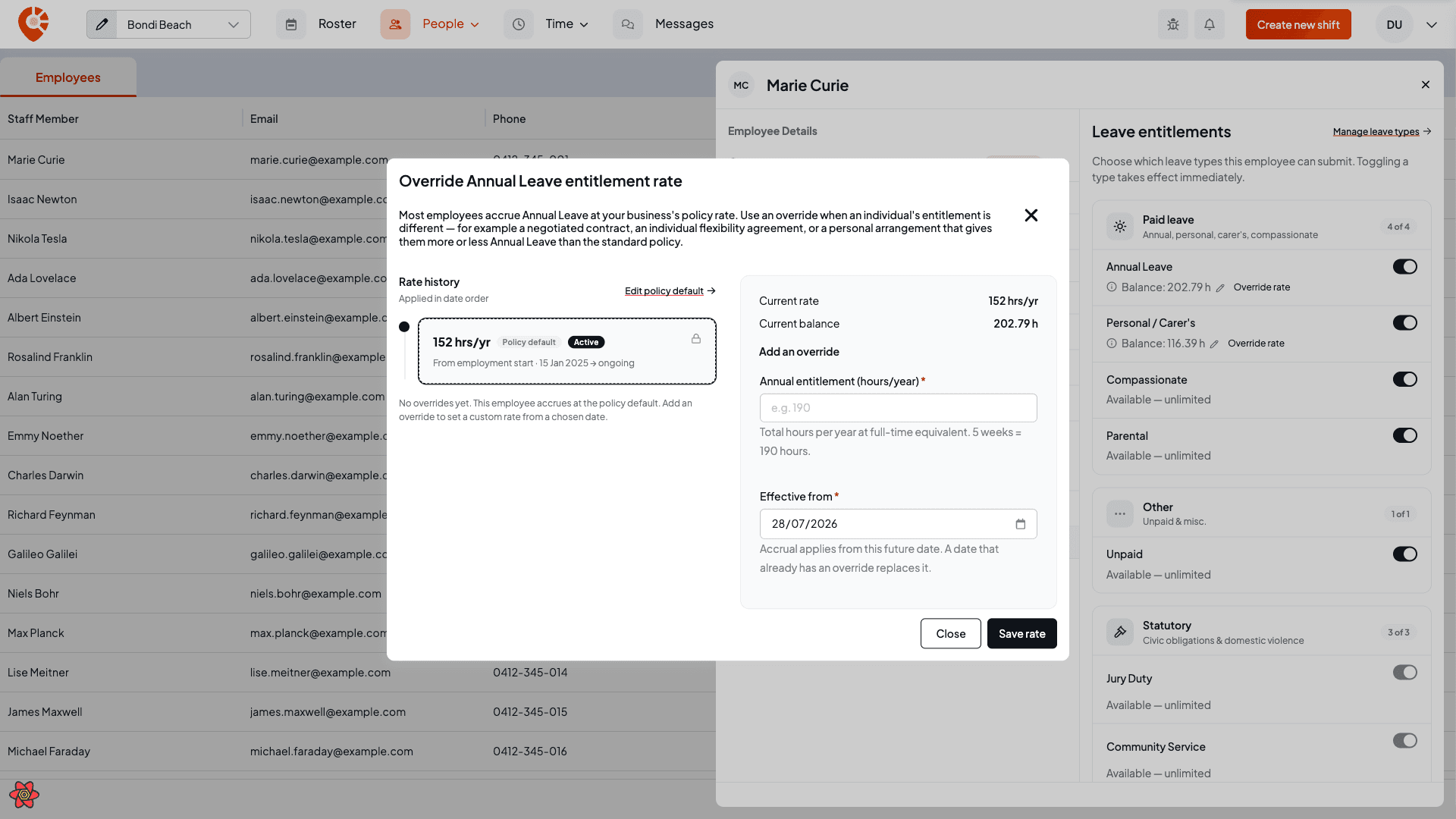
Example: five weeks instead of four. Annual leave policy is 152 hours/year (4 weeks). You give a senior employee 190 hours/year (5 weeks) from 1 July. From that date they accrue at the higher rate; everything they'd already built up stays exactly as it was. If the override starts partway through a cycle, Shiftly splits the cycle at that date: the period before 1 July keeps accruing at 152/year, the period after at 190/year, the same way a policy rate change is handled.
Example: a part-time employee. You set the same 190 hours/year override, but they work 19 hours a week. Pro-rata still applies, so they actually accrue 190 × (19 ÷ 38) = 95 hours/year. The override is always the full-time number; Shiftly scales it to their hours.
Forward-only
An override always takes effect from a future date (tomorrow onwards). Accrual applies from that date onward. Save one dated today or earlier and Shiftly stops you with "An override must take effect from a future date." Setting an override on a date that already has one replaces it.
Because leave that has already accrued can't be rewritten, you can only cancel an upcoming override that hasn't taken effect yet. Try to remove one that's already active or in the past and Shiftly stops you with "You can only cancel an override that hasn't taken effect yet."
To change course on an active override, you don't delete it: you add a new forward-dated entry on top. Want to put someone back on the standard rate? Add an override at the policy's rate (for example 152 hours/year) from a future date, and the timeline picks it up from there.
Edge cases worth knowing
- Overrides stack into a timeline. Each entry applies from its effective date until the next one. The Rate history shows the whole sequence: past (locked), active, and upcoming (cancellable).
- An override is tied to the leave type's method. If you change the method on the leave type itself (say from Fixed per year to Per hour worked), the override no longer matches and the employee falls back to the policy rate. Re-add an override under the new method if they still need one.
- It doesn't move the current balance. An override changes the rate, not the number on the balance today. For a correction (an opening balance, a one-off fix), use the inline balance adjustment, which is the sanctioned escape hatch and isn't forward-gated.
- Xero-managed leave ignores overrides. When your business manages leave in Xero, balances and entitlements come from Xero, so native overrides don't drive the numbers. See What syncs with Xero.
Related
Set how leave builds up
Set how a leave type builds up (method, rate, loading, cycle reset, carry-over, and request gating) and understand exactly how the numbers work, with examples and edge cases.
Approve or decline leave requests
Review a leave request, check the balance and roster impact, then approve, decline or cancel it, or add leave on an employee's behalf.