
Make a staff member a manager
Give one of your staff manager access, and choose exactly which venues they cover and what they can see and change.
You can make one of your existing staff a manager, choosing which venues they cover and exactly which parts of the business they can see and change. They stay on as an employee too.
Who this is for
Owners, and managers whose access includes editing Manage team access.
Before you start
- Open People from the main navigation and choose Employees.
- The Promote to Manager option appears for anyone who isn't already a manager, apart from yourself.
Promote a staff member
Choose Promote to Manager
Open the menu at the end of the staff member's row (the arrow) and select Promote to Manager.

Check their details and venues
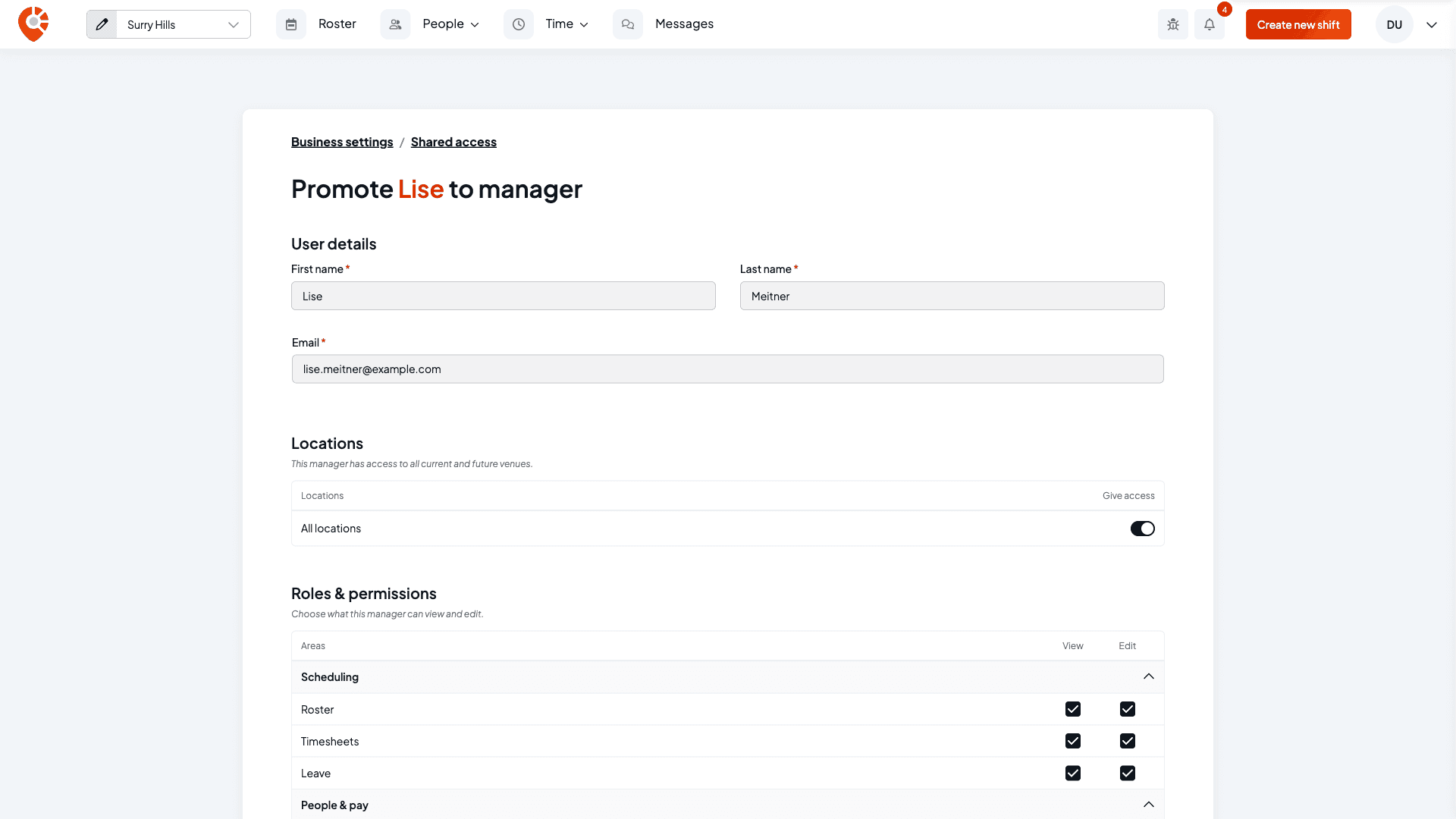
The Promote … to manager page opens with their name and email already filled in from their employee record, so you can't change them here.
Under Locations, leave All locations on to give them every current and future venue. Switch it off to choose venues one by one: every venue is listed switched on, so turn off the ones they shouldn't manage.
Choose what they can do
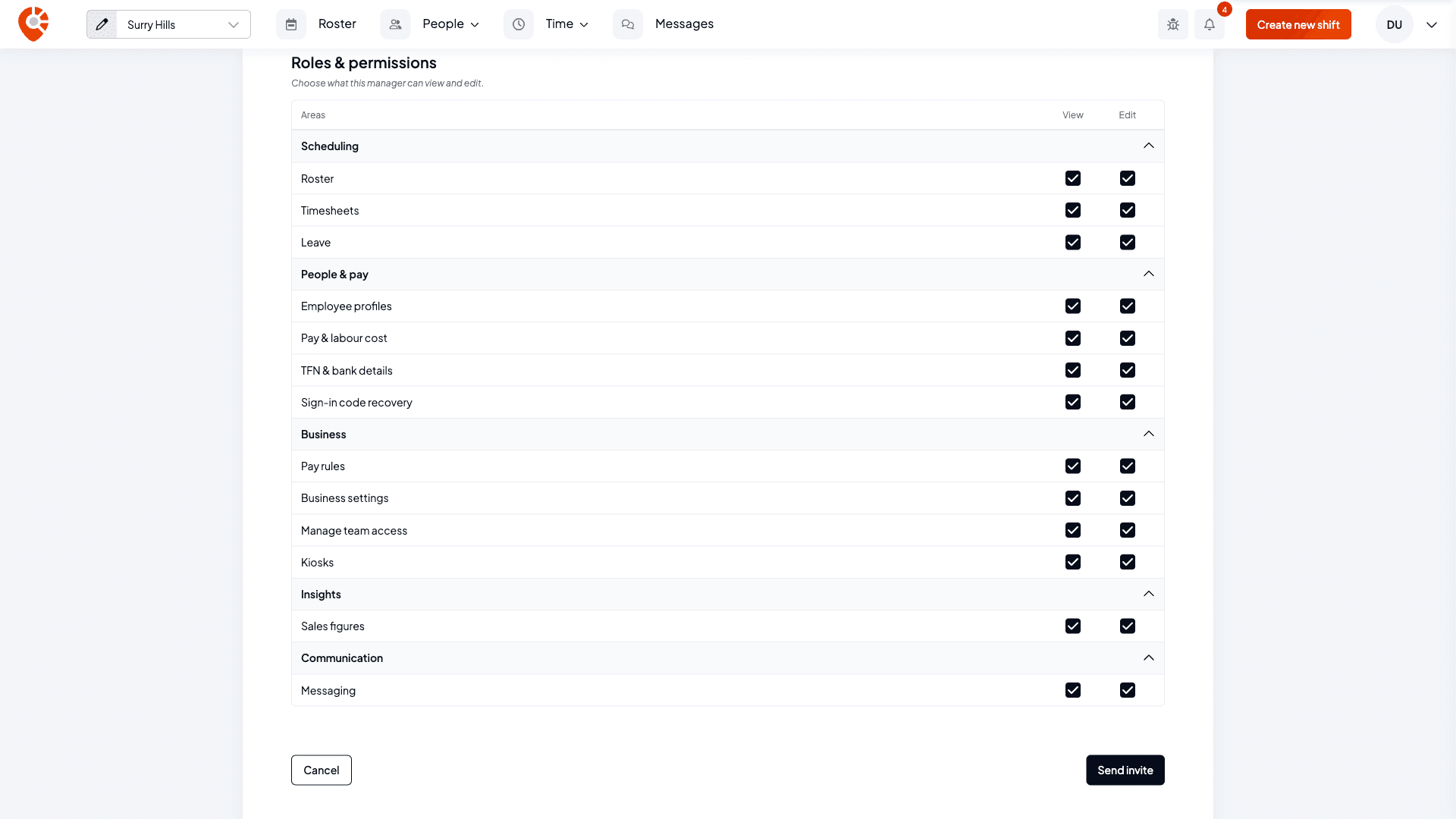
Roles & permissions is a grid of the areas of Shiftly, each with a View and an Edit box. Everything starts ticked, so untick what they shouldn't have:
- Scheduling: Roster, Timesheets, Leave
- People & pay: Employee profiles, Pay & labour cost, TFN & bank details, Sign-in code recovery
- Business: Pay rules, Business settings, Manage team access, Kiosks
- Insights: Sales figures
- Communication: Messaging
Tick View to let them see an area, and Edit to let them change it. The two are linked: ticking Edit turns View on with it, and clearing View clears Edit too. Areas left unticked don't appear for them. For example, a manager with view-only roster access doesn't see the roster's publishing controls.
Select a section heading to collapse it while you work on the others.
Send the invite
Select Send invite. They get manager access straight away and an email inviting them to sign in as a manager.
Be deliberate about TFN & bank details and Pay & labour cost: those expose employees' private financial information and your labour costs. Sign-in code recovery lets a manager create a sign-in code for a staff member who's locked out. Manage team access lets a manager change other people's permissions. If you're a manager yourself, you can only give access you have.
What changes
- The person keeps their employment record. They're still an employee you can roster and pay, and now a manager too.
- Their access covers the venues and areas you chose. You can change both later from Manage Access, the same screen that covers managers you invite directly. See Change or remove a manager's access.
- If you later remove them as an employee, their manager access remains and they can still sign in. See Removing staff.
Related
Change or remove a manager's access
Change which venues a manager covers and what they can do, or remove their access.
Inviting managers
Invite a manager who isn't already one of your staff.
Removing staff
Remove a staff member, including one who's also a manager.
Help a staff member sign in
Create a sign-in code, set a kiosk PIN or send a password reset link.
Update an employee's details and sign-in
Open a staff member's profile to manage their personal details, employment, pay, breaks, venues, bank, tax, super, sign-in, availability and leave.
Removing staff
Remove a staff member, and understand what happens to their shifts and records, including when they're also a manager.