
Update an employee's details and sign-in
Open a staff member's profile to manage their personal details, employment, pay, breaks, venues, bank, tax, super, sign-in, availability and leave.
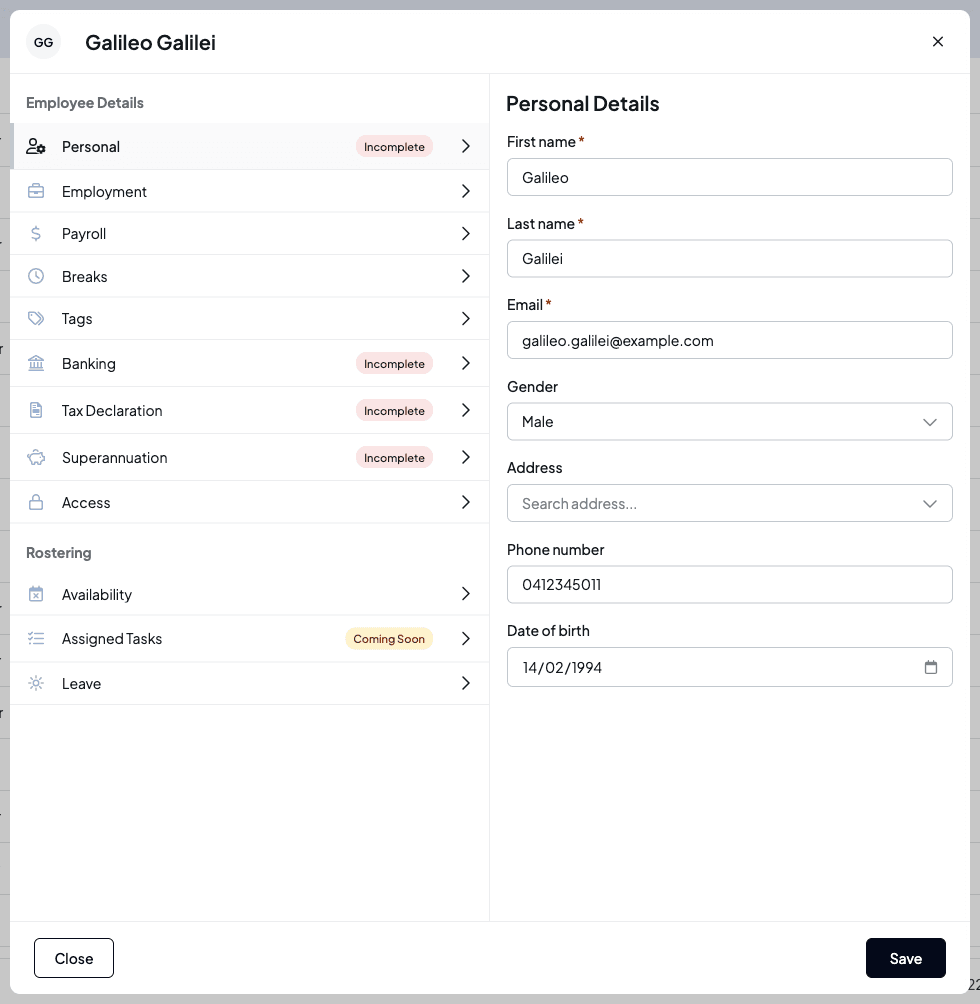
Selecting a staff member on the People page opens their profile: a side panel with every detail about them, grouped into tabs. Tabs that still need information are marked Incomplete, so you can see at a glance what's missing.
Who this is for
Owners and managers using the Shiftly web platform. Which tabs you see depends on your access: Payroll needs Pay & labour cost, Banking, Tax Declaration and Superannuation need TFN & bank details, and Access needs Sign-in code recovery or edit access to Employee profiles.
Before you start
- Open People from the main navigation, choose Employees, and select the staff member's name. To find someone quickly, type part of their name, email or phone number in the search box.
Find your way around
The profile has two groups of tabs. Employee Details holds Personal, Employment, Payroll, Breaks, Tags, Banking, Tax Declaration, Superannuation and Access. Rostering holds Availability, Assigned Tasks and Leave. Make your changes on a tab and select Save at the bottom, or Close to leave without saving.
Personal
The Personal tab holds the employee's name, email, gender, address, phone number and date of birth. Their email is the one they sign in with, so if you change it Shiftly asks you to confirm, and it can't be an email another account already uses. The date of birth must make them at least 13.
Employment
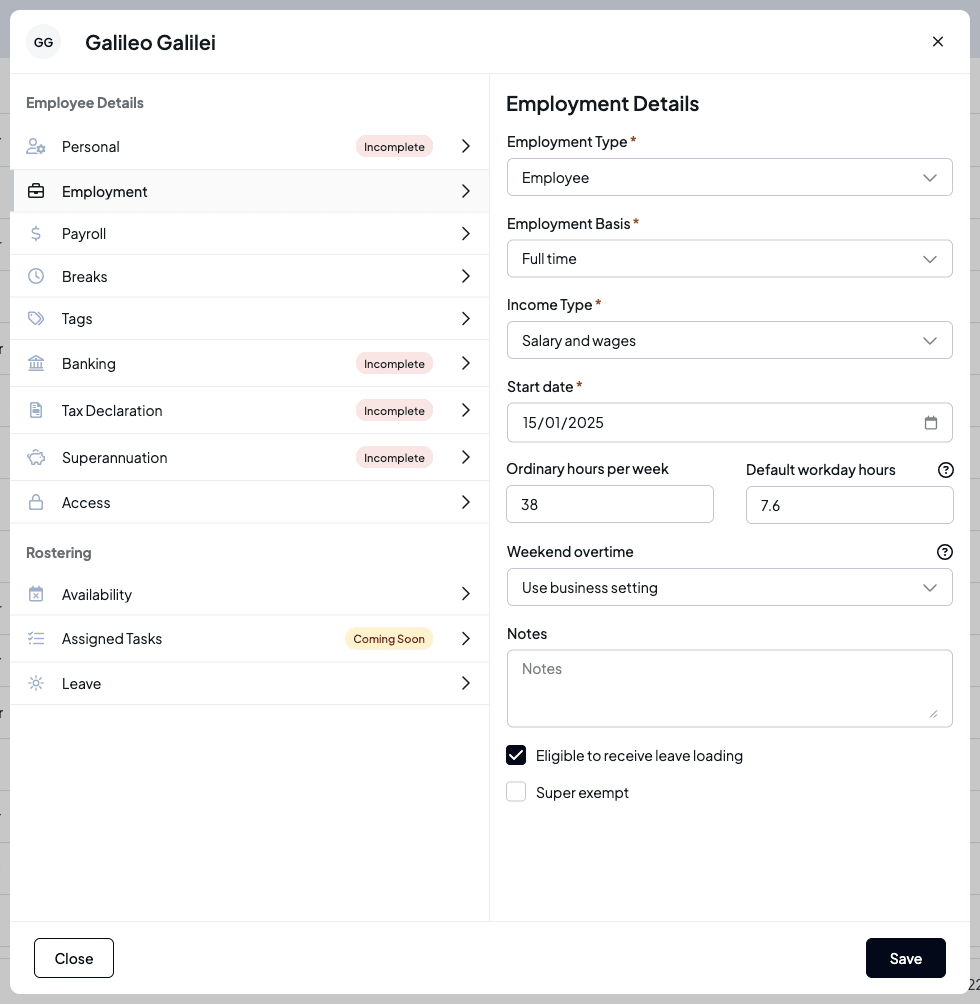
The Employment tab sets their employment type, basis and income type, their start date, ordinary hours per week and default workday hours, how weekend overtime applies to them, internal notes, and whether they get leave loading or are super exempt.
Changes take effect from a future date
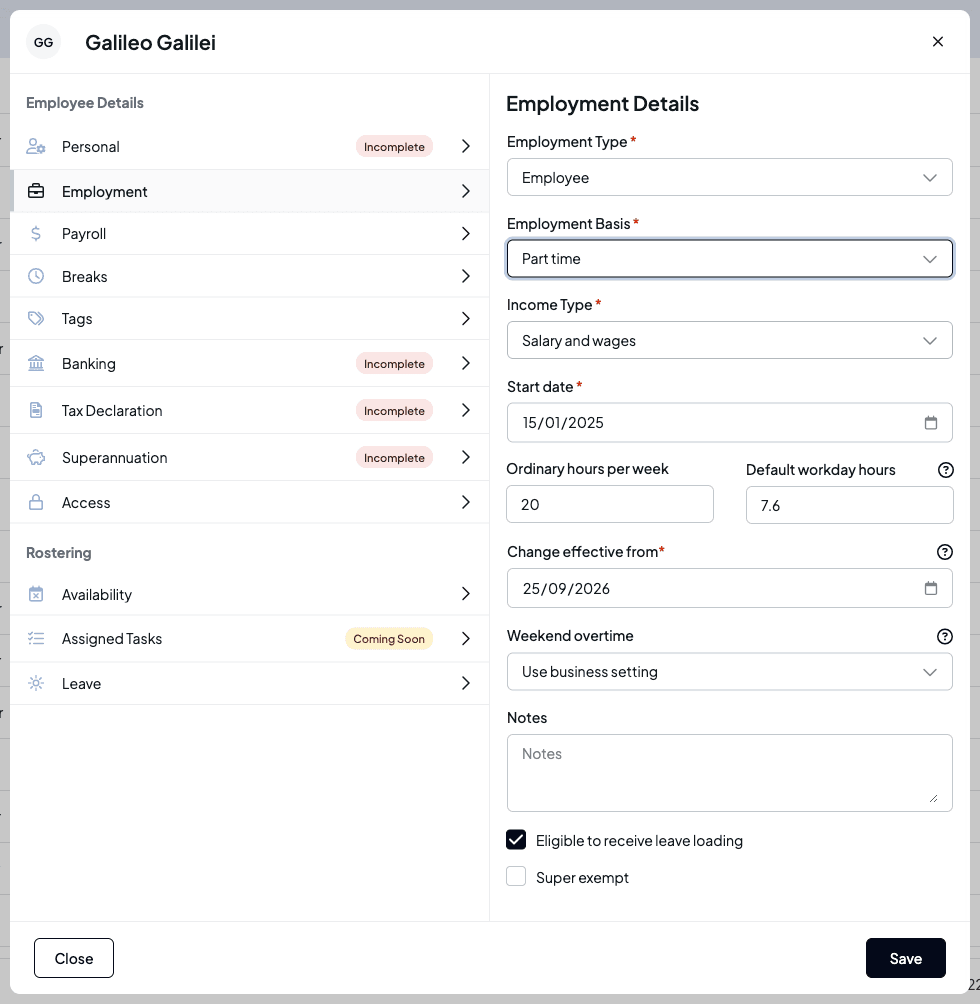
When you change the Employment Basis or the hours, a Change effective from date appears. It must be in the future, so pay that's already been worked isn't rewritten. Changing the basis, employment type or income type also clears the employee's classification, so you'll need to classify them again.
Employment locks while leave is open
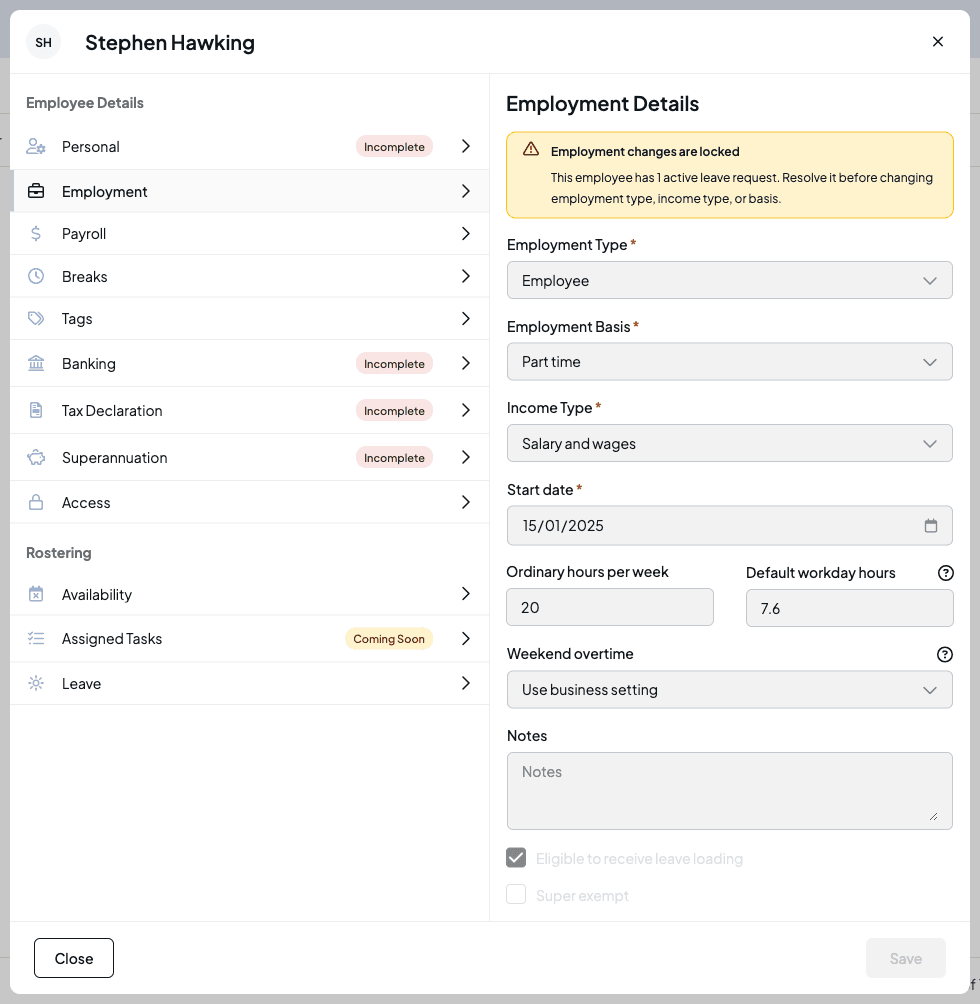
If the employee has a pending leave request, or approved leave that hasn't finished, the Employment tab is locked and says Employment changes are locked. Resolve their leave before you change their employment type, income type, basis or hours. If Shiftly can't check their leave, it shows Leave check unavailable and keeps the fields locked until you refresh.
Payroll
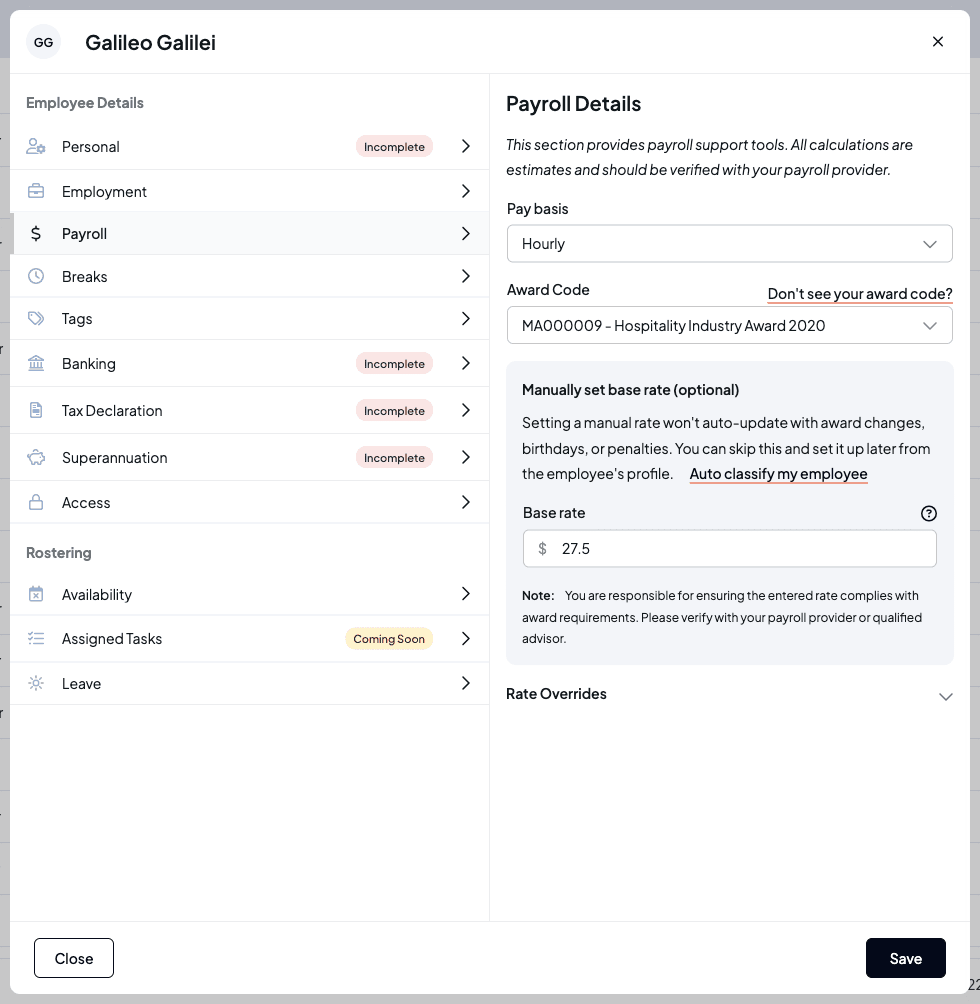
The Payroll tab holds how they're paid (for example Hourly), their Award Code, their base rate and any Rate Overrides. See Rate overrides & allowances and Classifying staff.
Breaks
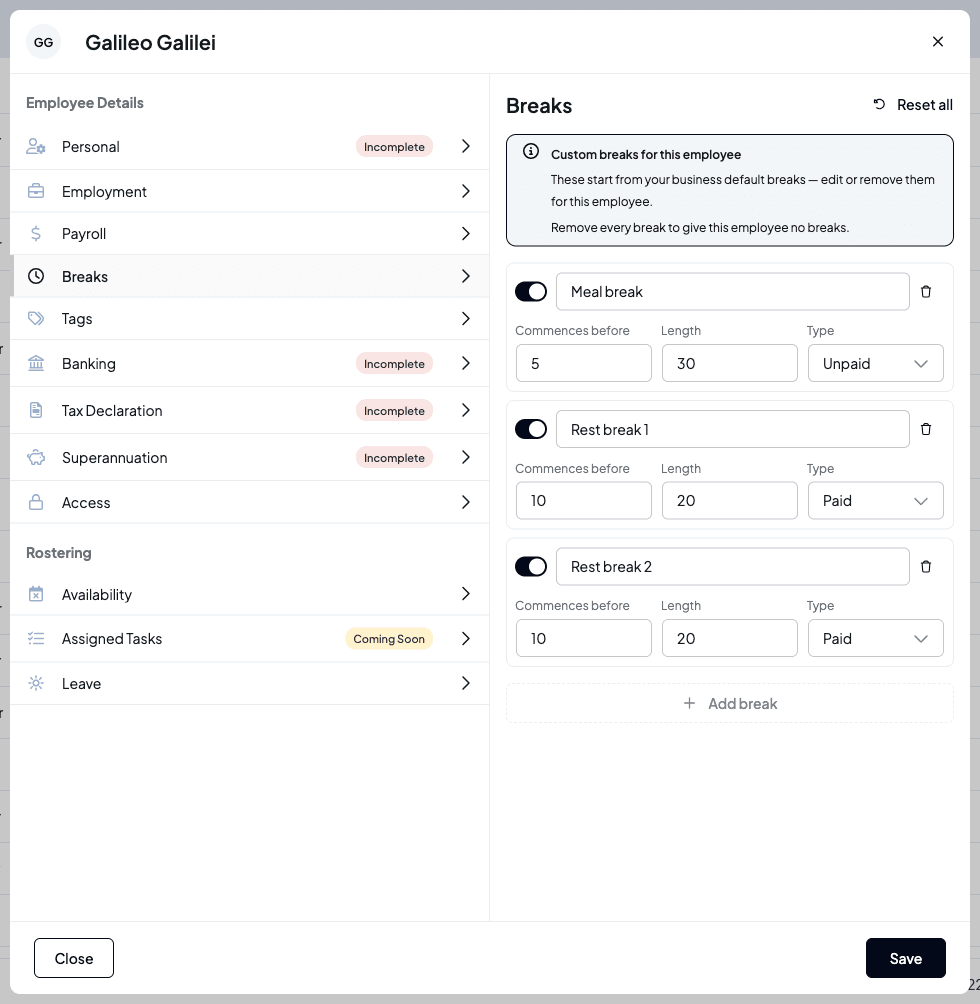
The Breaks tab sets the breaks this person gets, separately from everyone else. It starts from your business's default breaks. Each break has a Commences before time, a Length and a Type (paid or unpaid). Edit the rows, select Add break for another, or remove every break to give this employee none. Reset all puts them back on the business defaults.
Tags: locations and positions
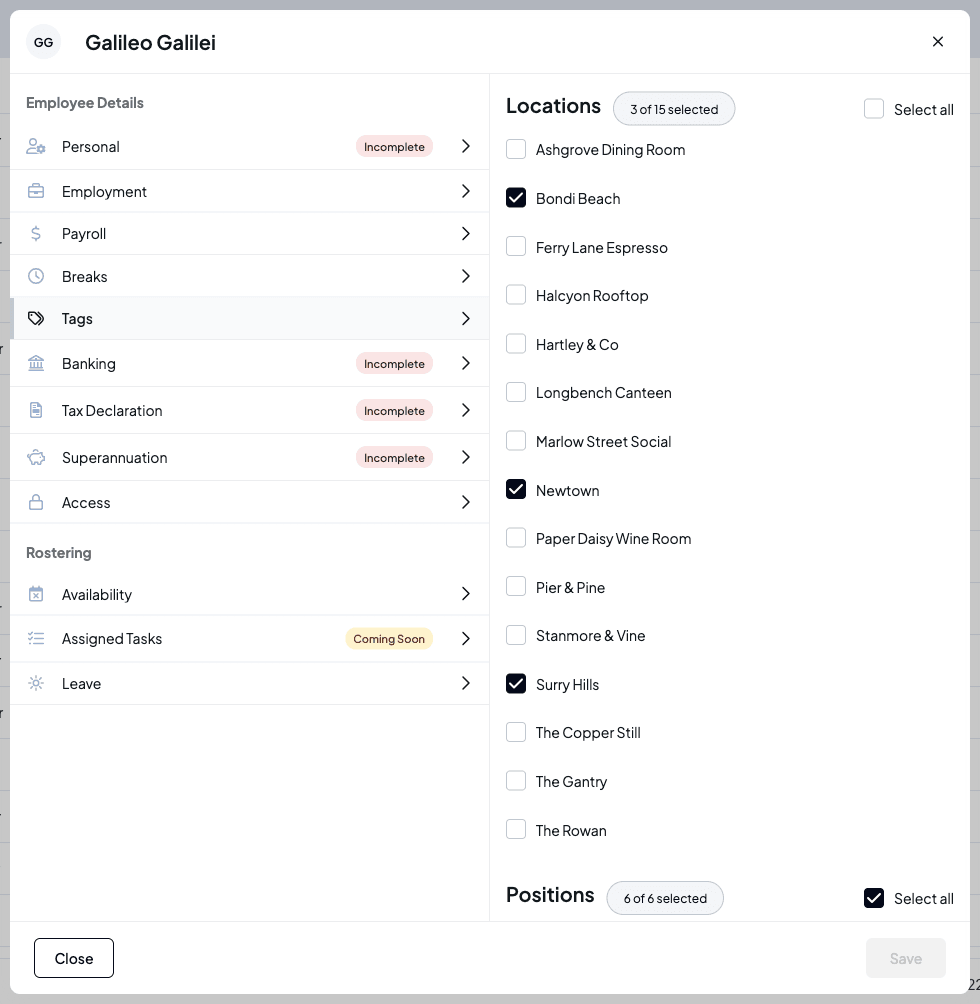
The Tags tab controls where and what the employee can work. Locations sets which of your venues they belong to. Positions lists the positions they can be rostered in: untick one and it won't be offered for them when you roster. Select all ticks every one.
Banking
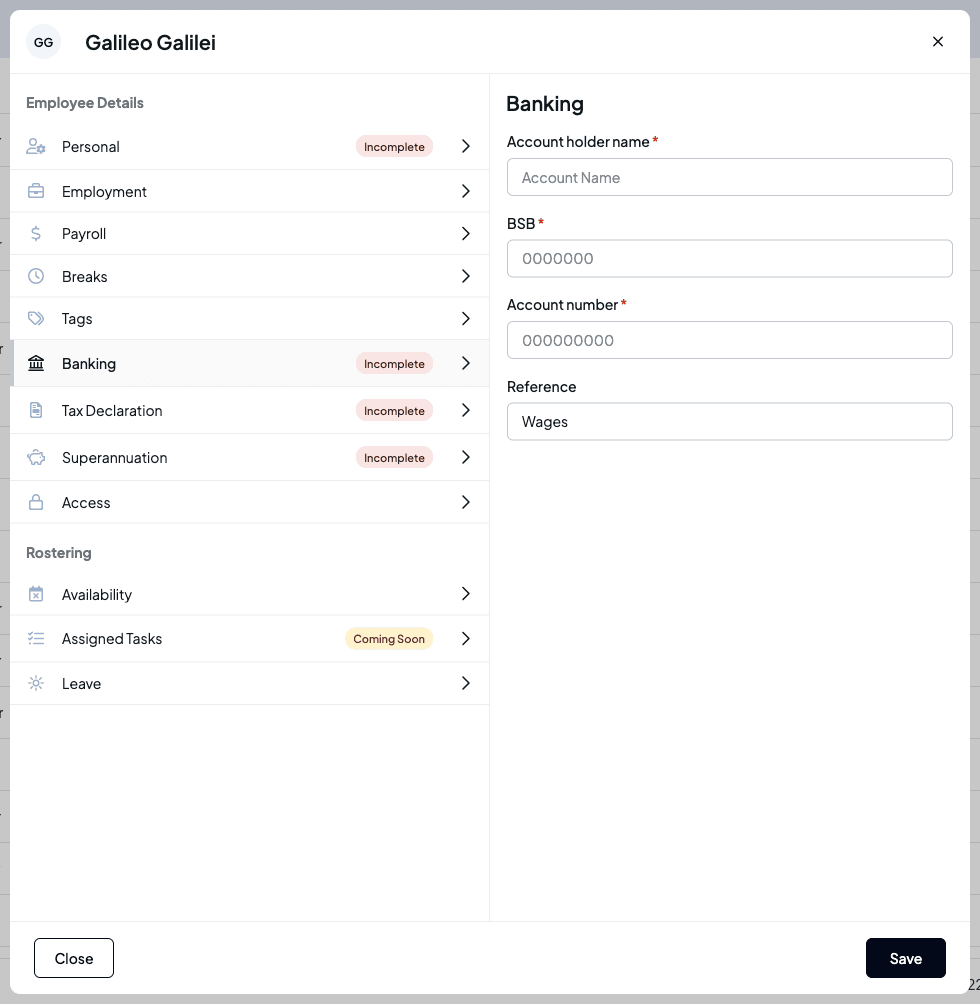
The Banking tab records the bank account they're paid into: account holder name, BSB, account number and a reference, which starts as "Wages".
Tax declaration
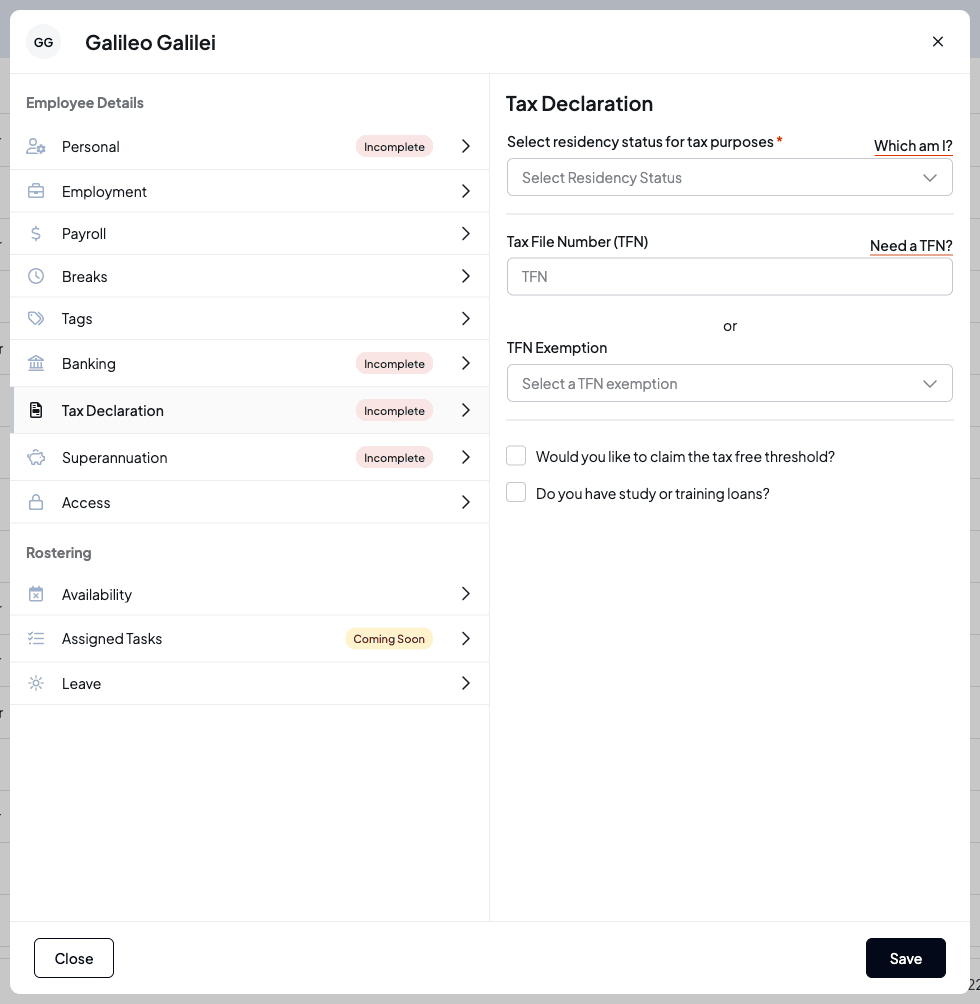
The Tax Declaration tab captures their residency status for tax purposes, their tax file number (TFN) or a TFN exemption, whether they claim the tax-free threshold, and whether they have a study or training loan.
Superannuation
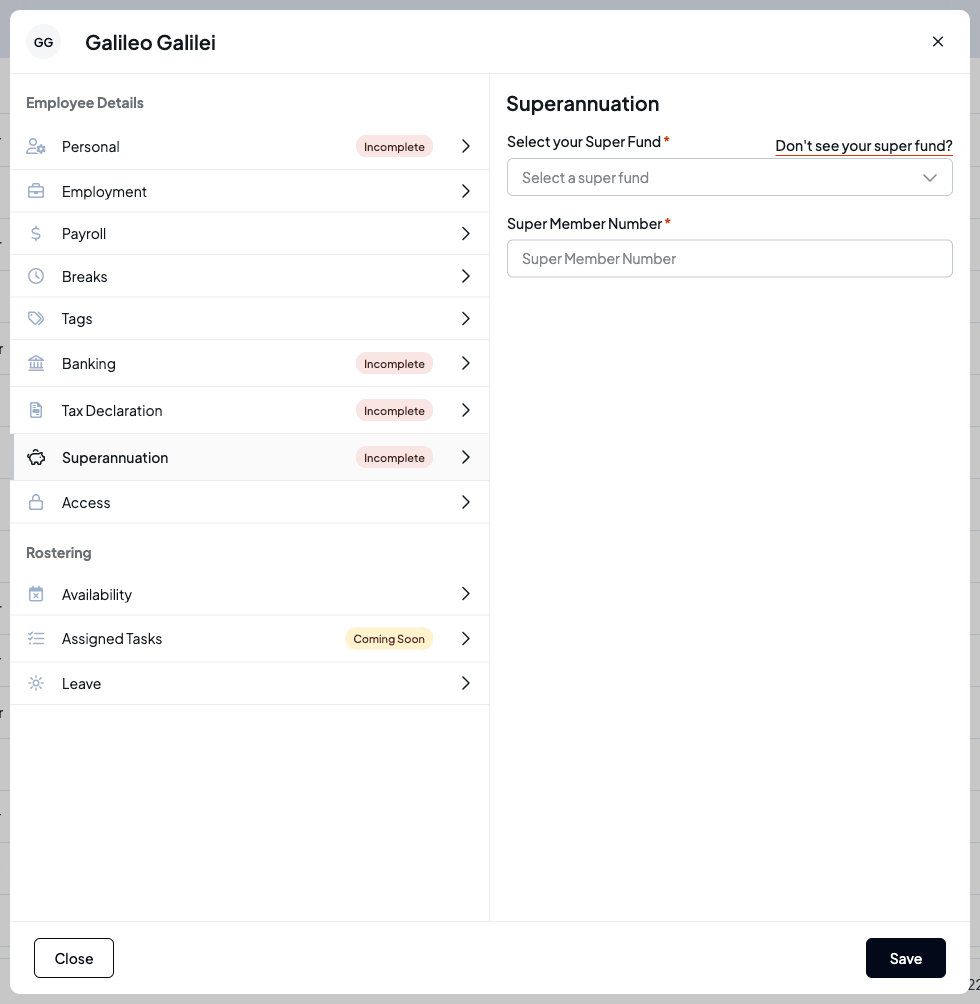
The Superannuation tab lets you search for their super fund by name and record their member number. If you can't find the fund, use Don't see your super fund? to add it by its USI (unique superannuation identifier).
Access: help them sign in
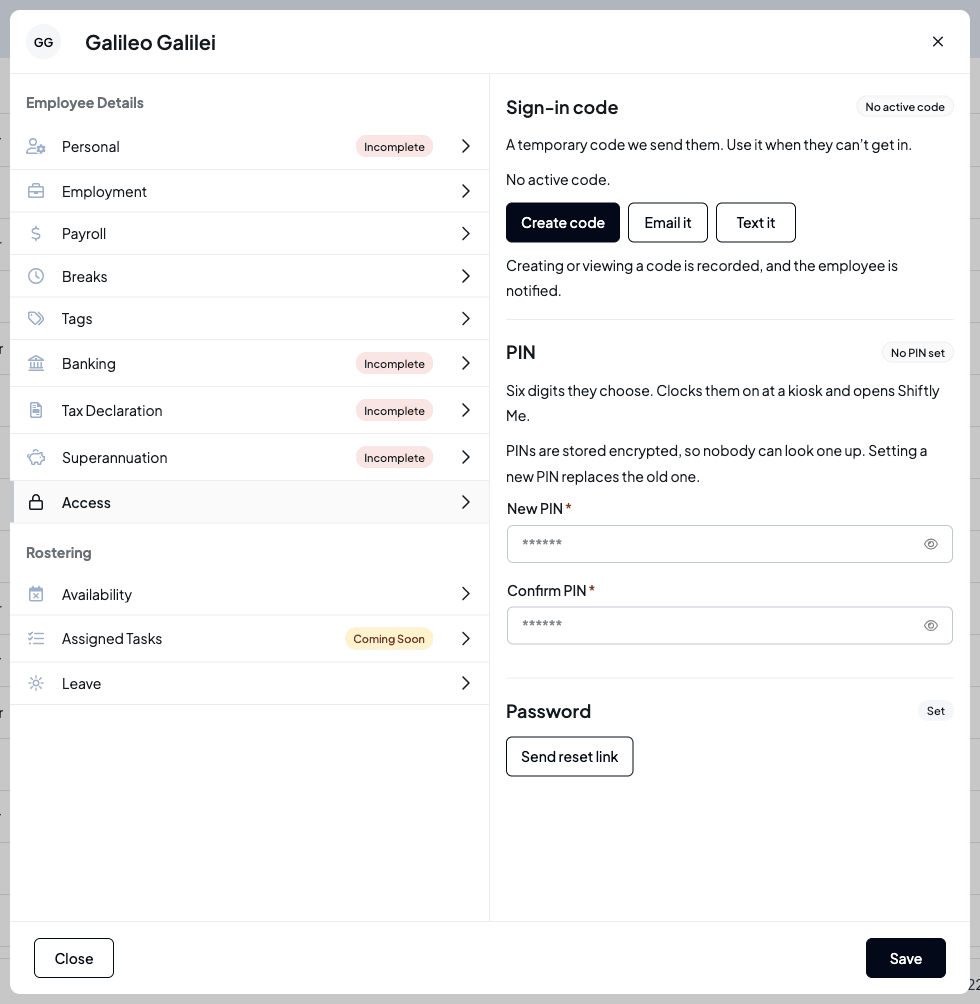
The Access tab is where you help someone who can't get in. Each section shows its current state at the top right.
Give them a sign-in code
Under Sign-in code:
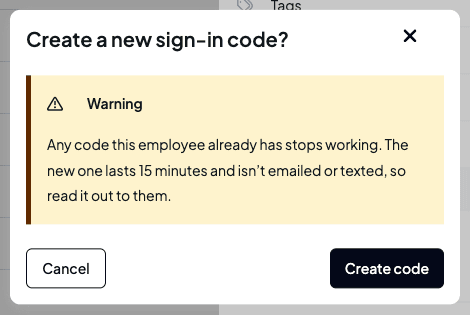
- Create code makes a code that lasts 15 minutes. It isn't emailed or texted, so read it out to them. Any code they already had stops working.
- Email it or Text it sends them their current code, or a new one if they don't have one. Texting only works with an Australian mobile number on their profile.
- Show code appears while a code is active, so you can read it to them again.
Creating or viewing a code is recorded, and the employee is notified. If they've used up their attempts on a code, you'll see Too many incorrect attempts, and creating a new code resets that.
Set their kiosk PIN
Under PIN, enter six digits in New PIN and Confirm PIN, then select Save. The PIN clocks them on at a venue kiosk and opens Shiftly Me. Shiftly won't accept an easy-to-guess PIN such as repeated or sequential digits, and a PIN you set is one they'll be asked to change. PINs are stored encrypted, so nobody can look one up; setting a new one replaces the old one.
If they haven't finished setting up their account yet, you'll see No PIN yet instead. Invite them to Shiftly Me first. Only the business owner can change how another manager signs in.
Send a password reset link
Under Password, select Send reset link and confirm. They get an email with a link to set a new password, and their current password keeps working until they use it.
To set up the kiosk itself, see Set up a clock-in kiosk.
Availability
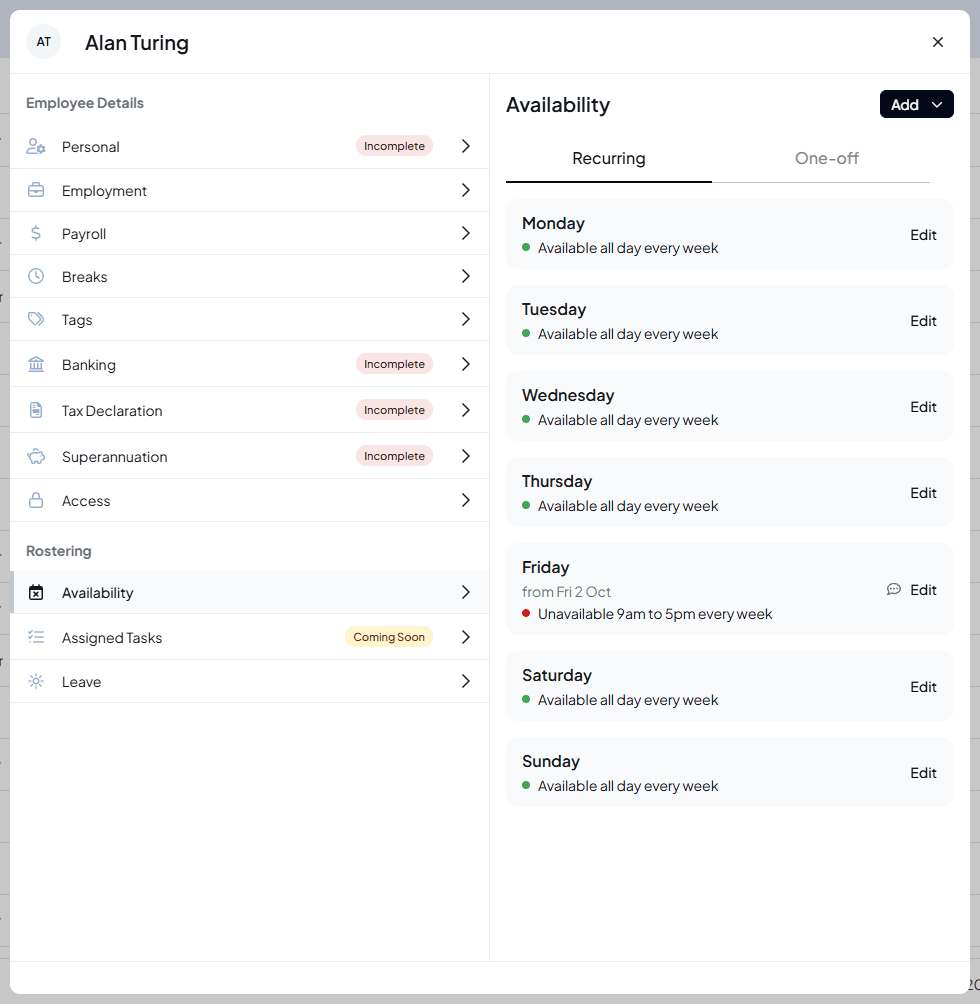
The Availability tab holds the employee's availability rules, which the roster uses when you schedule them. With no rules they're available all day, every day. Staff set their own rules in Shiftly Me, and you can add, change and delete them here. Either of you can change a rule the other added.
- Recurring has a card for each day of the week, with the rules that repeat on that day. A day with no rules reads Available all day every week. A red dot marks unavailability and a green dot availability. A rule that hasn't started yet shows its first date under the day, such as from Fri 2 Oct, and a speech-bubble icon means it has a comment: hover it to read it.
- One-off lists rules for particular dates, with a count of those that haven't ended. With none, it says No one-off rules.
Rules that have ended aren't shown.
Start a rule
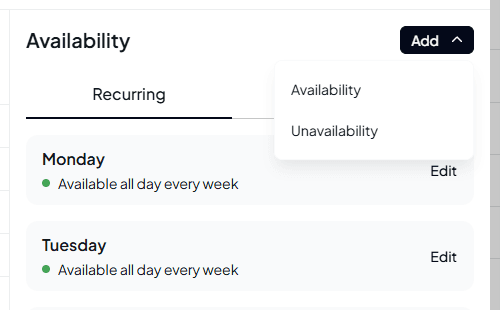
Select Add, then choose what the rule is:
- Unavailability for times they can't work.
- Availability for the only times they can work. Outside those times, they count as unavailable.
You can also select Edit on a day with no rules to add a rule that repeats on that day. At the top of the window, choose whether they're Unavailable or Available.
Set when it applies
Choose the date it Starts (today or later). With All day switched on, the rule covers the whole day; switch it off to set From and To. A rule can't run past midnight, so an overnight pattern takes two rules.
Under Repeat, the choices are worded from the start date, so for a rule about Fridays, start it on a Friday. The choices read, for example, Don't repeat, Every Friday, Every second Friday or The first Friday of every month.
The box beside Repeat sets when the rule ends:
- For a repeating rule, leave Doesn't end, or choose On a date and pick the date it Ends on.
- For a rule that doesn't repeat, leave One day, or choose More than one day for a run of days, such as a week away, and pick the Last day.
Add a Comment if you like, up to 500 characters: the employee sees it too.
Check and save
The box at the bottom reads the rule back, lists the next three dates for a repeating rule, and warns you if it clashes with shifts they're already rostered on, for example Clashes with 1 rostered shift. Fri 2 Oct, 4pm to midnight at Bondi Beach. You can still save. Only published shifts count. Select Save, or Cancel to leave without adding it.
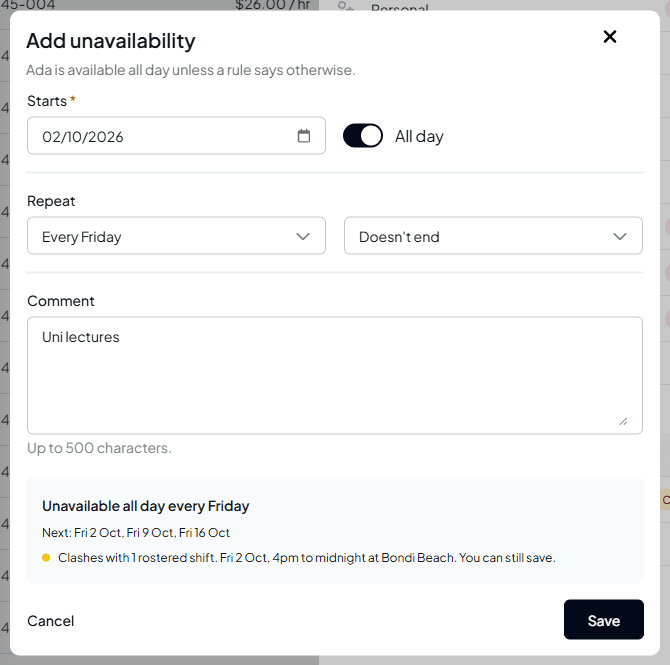
Saving a rule that clashes doesn't change the roster: the person stays on those shifts until you change them. The staff member isn't sent an alert about a change you make, and the business setting Block unavailability over published shifts never stops a change you make here. If Shiftly couldn't check the roster, it says so and still lets you save, checking again when you do. It won't save a rule that changes nothing, such as availability all day on a day with no rules, and says This rule changes nothing with what already applies.
Change or delete a rule
Select Edit beside a rule. At the top of the window, choose whether they're Unavailable or Available, and change anything else, then select Save. To leave without changing it, close the window. Changes only apply from today: if the rule has already started, the window says Changes apply from today, and the roster before today keeps the old rule.
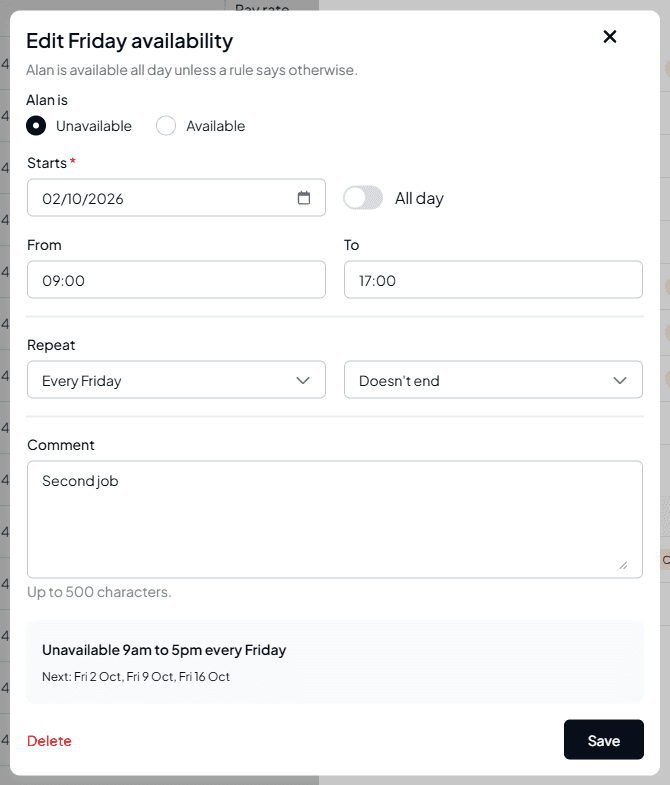
To delete the rule, select Delete at the bottom left of the window, then confirm Delete this rule? A rule that has already started stops applying from today and earlier dates stay as they were; one that hasn't started yet is removed completely.
If you can see this employee but not edit them, the tab says View only and there's no way to add or edit rules. To see how availability shows on the roster, see See availability, leave and weather on the roster.
Leave
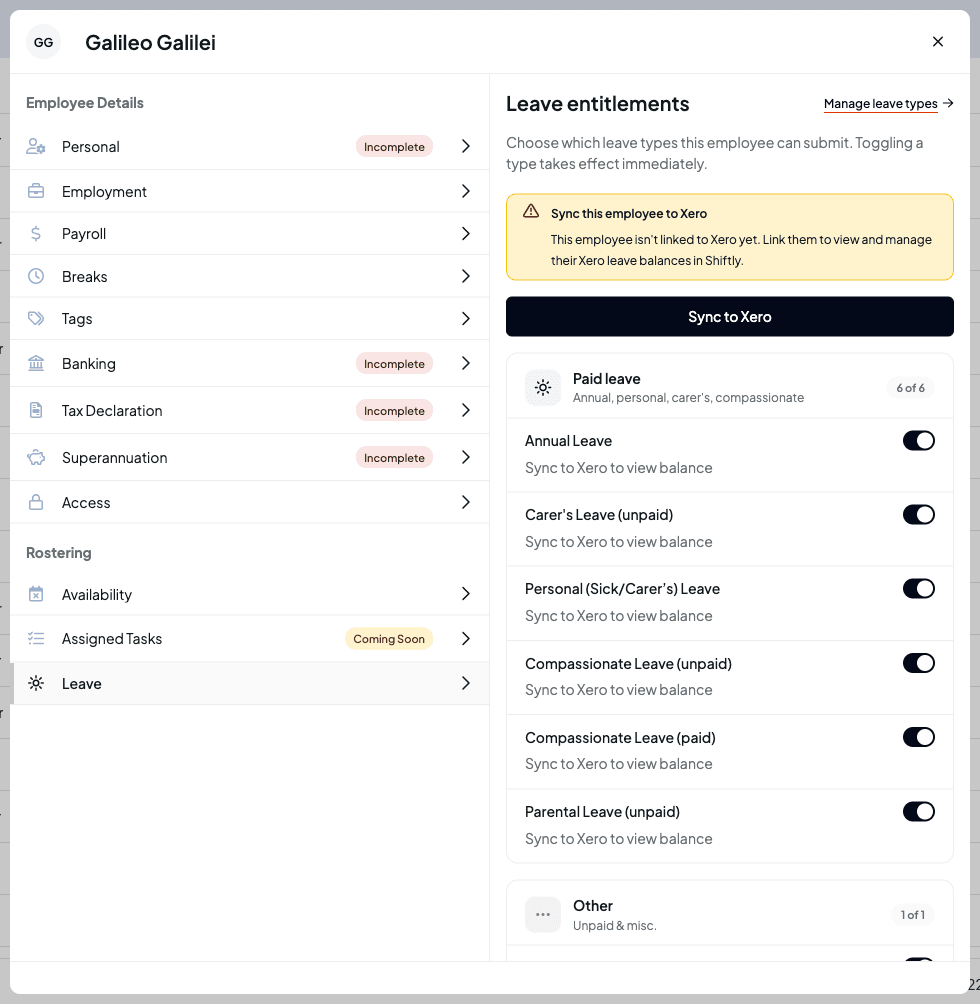
The Leave tab lists the leave types the employee can request under Leave entitlements. Switch a type off to stop them requesting it; the change takes effect straight away. Statutory types such as jury duty and family and domestic violence leave are always on. Manage leave types takes you to your business's leave settings.
What you see under each type depends on where your leave balances live:
- Balances kept in Shiftly: each type shows the employee's balance, which you can select and edit, and an Override rate link to give them a custom accrual rate.
- Balances kept in your payroll provider (for example Xero): balances come from the provider and can't be edited here. If the employee isn't linked to the provider yet, you'll see Sync this employee to Xero with a button to link them. Once they're linked, a note explains that Xero manages the balances and Shiftly manages which types they can request.
The screenshot shows a business connected to Xero, for an employee who isn't linked yet. See Approving & declining leave.
Assigned Tasks is marked Coming Soon and isn't available yet.